 RSS Feed (xml)

Tuesday, January 20, 2009

Wednesday, November 26, 2008
Webcam snapshots with Flex3
If you need to put a webcam snapshot on your webpage to take snaps of your users, you can use Flex to do it.
Here is a really good way to do it

Here is a really good way to do it
Friday, November 21, 2008
Spinner online generator
It's easy to need a spinner gif to put it on our AJAX apps. On ajaxload.info you can find a real time generator of loading gifs on you needed colors.


Thursday, November 20, 2008

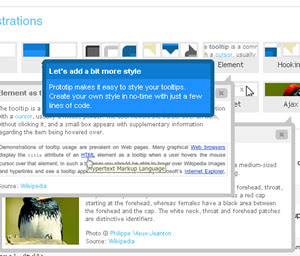
Prototip 2:
Prototip allows you to easily create both simple and complex tooltips using the Prototype javascript framework.

Monday, November 10, 2008
Wednesday, September 24, 2008
Dewplayer the easiest flash mp3 player
The easiest way to put mp3 audio files on your web pages ! This flash animation is very light and easy to use. It downloads and plays the mp3 file when the play button is pressed.

Dewplayer is under Creative Commons licence. The usage is totally free even for commercial purposes (but not reselling it).
Homepage

Dewplayer is under Creative Commons licence. The usage is totally free even for commercial purposes (but not reselling it).
Homepage
Tuesday, September 9, 2008
Remote Desktop Connections IP Log
Obtain IP log of all Remote Desktop Connections to our Server
netstat -na|find ":3389" > prueba.txt
netstat -na|find ":3389" > prueba.txt
Thursday, August 28, 2008
IE7 DOM table creation
It's usual to create dynamic elements with DOM, but when you try to create a table element on IE7 it doesn't appear. You can solve that problem by using the tbody element between the table tag and the tr tag
Wednesday, August 20, 2008
Enter on Javascript
If you need to capture the enter keypress on a webpage for example for submitting a form, you can do it with something like that:
tecla_pulsada = (document.all) ? e.keyCode : e.which;
if (tecla_pulsada==13){ //hacer lo que sea }
Monday, August 18, 2008
CSS Reset
CSS Reset is a technique to reset all explorer default CSS. With this techinque we can solve the most common problems, of designing a webpage.
Then you need to include this css library before the other CSS libraries of your webpage.
Cheers
html, body, div, span, applet, object, iframe,
h1, h2, h3, h4, h5, h6, p, blockquote, pre,
a, abbr, acronym, address, big, cite, code,
del, dfn, em, font, img, ins, kbd, q, s, samp,
small, strike, strong, sub, sup, tt, var,
dl, dt, dd, ol, ul, li,
fieldset, form, label, legend,
table, caption, tbody, tfoot, thead, tr, th, td {
   margin: 0;
   padding: 0;
   border: 0;
   outline: 0;
   font-weight: inherit;
   font-style: inherit;
   font-size: 100%;
   font-family: inherit;
   vertical-align: baseline;
}
/* remember to define focus styles! */
:focus {
   outline: 0;
}
body {
   line-height: 1;
   color: black;
   background: white;
}
ol, ul {
   list-style: none;
}
/* tables still need 'cellspacing="0"' in the markup */
table {
   border-collapse: separate;
   border-spacing: 0;
}
caption, th, td {
   text-align: left;
   font-weight: normal;
}
blockquote:before, blockquote:after,
q:before, q:after {
   content: "";
}
blockquote, q {
   quotes: "" "";
}
Then you need to include this css library before the other CSS libraries of your webpage.
Cheers
Friday, July 18, 2008
Linux Find and Sed commands
This days I'm migrating from domainA.com to domainB.com and I need to replace the links in so many files at time.
The best way I found to do this is this:
Find all PHP files with the "domainA.com" string inside it:
find . -name "*.php*" -type f -print0|xargs -0 grep "domainA.com" >> smaCat.log
Replace all PHP it with command:
find ./* -name "*.php*" -type f -exec sed -i 's/domainA.com/domainB.com/g' {} \;
The best way I found to do this is this:
Find all PHP files with the "domainA.com" string inside it:
find . -name "*.php*" -type f -print0|xargs -0 grep "domainA.com" >> smaCat.log
Replace all PHP it with command:
find ./* -name "*.php*" -type f -exec sed -i 's/domainA.com/domainB.com/g' {} \;
Thursday, July 17, 2008
IE6 and transparent PNG
Usually we develop a webpage using png images, it really looks better at IE7 and Firefox. But when we try to see that webpage with IE6 it doesn't shows the PNGs transparency :-(
For preventing this you can add this JavaScript Library to your webpage and just with an include like this:
Makes your webpage compatible with any transparent PNGs.
Download - Home
For preventing this you can add this JavaScript Library to your webpage and just with an include like this:
Makes your webpage compatible with any transparent PNGs.
Download - Home
Wednesday, July 16, 2008
Symfony Step1
A few days ago I started a symfony project, and there is some comandos that i will share width yours....

Creating a project
$ mkdir /home/sfprojects/askeet
$ cd /home/sfprojects/askeet
$ symfony init-project askeet
Creating an application on your project
$ symfony init-app frontend
After do that you created a new application called frontend that can be accessed from :
http://localhost/frontend_dev.php/
By default you can see the symfony default webpage of a symfony project.
See you tomorrow!!!
Monday, June 9, 2008
Sunday, June 8, 2008
OS X: Capture a piece of screen
This days I'm just testing my new macbook pro and I found the way to take a screenshot from just a piece of screen.
Cmd+MAY+3. Complete screen to a Desktop png
Cmd+Ctrl+MAY+3. Complete screen ready for paste.
Cmd+MAY+4. You can select a piece of your screen by a cursor, and save it automaticaly on the desktop.
Cmd+Ctrl+MAY+4. You can select a piece of your screen by a cursor and save it where you want.
Cmd+MAY+4 and the spacebar The cursor becomes a camera and you can select the aplication for create your 'appShot' saveing it automatically on the desktop.
Here is the chain codes for this utility:
Cmd+Ctrl+MAY+3. Complete screen ready for paste.
Cmd+MAY+4. You can select a piece of your screen by a cursor, and save it automaticaly on the desktop.
Cmd+Ctrl+MAY+4. You can select a piece of your screen by a cursor and save it where you want.
Cmd+MAY+4 and the spacebar The cursor becomes a camera and you can select the aplication for create your 'appShot' saveing it automatically on the desktop.
Cmd+Ctrl+MAY+4 and the spacebar the same but ready for paste.

Friday, June 6, 2008


Subscribe to:
Posts (Atom)